Java Basic Activities: Increment and Decrement Operators


=====================
Code: 
=======================


public class Test23_Pereda_increment {

public static void main(String [] args) {

int x= 1, y = 1;

   ++x;
   ++y;
   
   System.out.println("Value of x: " +x);
   System.out.println("Value of x: " + ++x);
   System.out.println("Value of x: " + ++x);
   
   System.out.println("\n\nValue of y: " +y);
   System.out.println("Value of x: " + ++y);
   System.out.println("Value of x: " + ++y);


}

}
==================================
Sample no. 2


=======================
Code: 
======================


public class Test24_Pereda_Challege {

public static void main(String [] args) {

int x= 1, y = 1;

   ++x;
   ++y;
   
   System.out.println("Value of x: " +x);
   System.out.println("Value of x: " + ++x);
   System.out.println("Value of x: " + ++x);
   
   System.out.println("\n\n\nValue of y: " +y);
   System.out.println("Value of x: " + ++y);
   System.out.println("Value of x: " + ++y);
   
   System.out.println("\n\n\nValue of x: " + --x);
   System.out.println("Value of y: " + --y);


}


}

===========================================


Java Basic Activities: Getting the user's input


===============================
Code: 
===============================

import java.util.Scanner;

public class Test17_Pereda_Scanner {

public static void main(String [] args) {

Scanner input = new Scanner(System.in);

String name1;
String name2;

System.out.println("Enter Your Full Name:");
name1 = input.nextLine();

System.out.println("What is Your Last Name:");
name2 = input.nextLine();


System.out.println("\n\nYour full name:" +name1);
System.out.println("\n\n Your last name:" +name2);


input.close();


}
}

============================================

Get the user's integer input


import java.util.Scanner;

public class Test18_Pereda_Scannerint {

public static void main(String [] args) {   

Scanner input = new Scanner(System.in);

int num1, num2;

System.out.println("Enter two intergers:");

num1 = input.nextInt();
num2 = input.nextInt();

System.out.println("The number you entered: " + num1 + " and " +num2);

input.close();
     }

}


==================================================================

Get the user's integer input w/ double and float data type


==========================
Code
==========================
import java.util.Scanner;

public class Test19_Pereda_Scannerfloat {

public static void main(String [] args) {  

Scanner input = new Scanner(System.in);

float num1;
double num2;

System.out.println("Enter num1:");
num1 = input.nextFloat();

System.out.println("Enter num2:");
num2 = input.nextDouble();

System.out.println("\n\nThe number you entered: " + num1 + " and " +num2);

input.close();

}
}


=====================================================


Get the user's string input

======================================================


import java.util.Scanner;

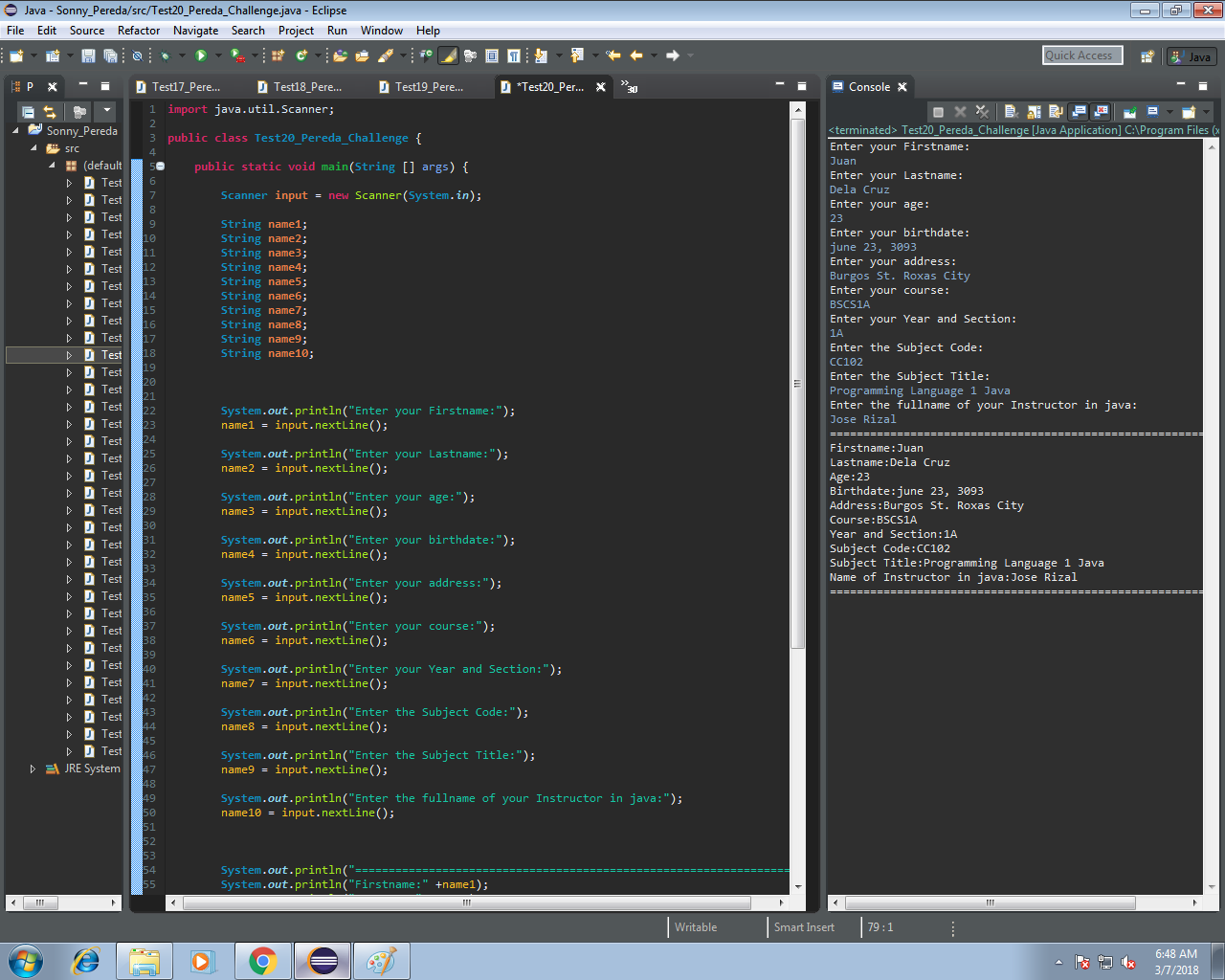
public class Test20_Pereda_Challenge {

public static void main(String [] args) {

Scanner input = new Scanner(System.in);

String name1;
String name2;
String name3;
String name4;
String name5;
String name6;
String name7;
String name8;
String name9;
String name10;


System.out.println("Enter your Firstname:");
name1 = input.nextLine();

System.out.println("Enter your Lastname:");
name2 = input.nextLine();

System.out.println("Enter your age:");
name3 = input.nextLine();

System.out.println("Enter your birthdate:");
name4 = input.nextLine();

System.out.println("Enter your address:");
name5 = input.nextLine();

System.out.println("Enter your course:");
name6 = input.nextLine();

System.out.println("Enter your Year and Section:");
name7 = input.nextLine();

System.out.println("Enter the Subject Code:");
name8 = input.nextLine();

System.out.println("Enter the Subject Title:");
name9 = input.nextLine();

System.out.println("Enter the fullname of your Instructor in java:");
name10 = input.nextLine();


System.out.println("=========================");
System.out.println("Firstname:" +name1);
System.out.println("Lastname:" +name2);
System.out.println("Age:" +name3);
System.out.println("Birthdate:" +name4);
System.out.println("Address:" +name5);
System.out.println("Course:" +name6);
System.out.println("Year and Section:" +name7);
System.out.println("Subject Code:" +name8);
System.out.println("Subject Title:" +name9);
System.out.println("Name of Instructor in java:" +name10);
System.out.println("=======================");


input.close();

}

}


=====================================================

Get the user's integer input and display the sum

=======================================================


=============================
Code: 
====================

import java.util.Scanner;

public class Test21_Pereda_operator {

public static void main(String [] args) {

Scanner input = new Scanner(System.in);

int num1, num2, sum;

System.out.println("Enter First num: ");
num1 = input.nextInt();

System.out.println("Enter Second num :");
num2 = input.nextInt();

sum = num1 + num2;

System.out.println("\n\n\nThe sum of the first and 2nd numbers:" + sum);


input.close();

}

}

==============================================

Get the user's integer input and display the sum , difference, product and quotient of the two integers


=====================
Code:
=====================


import java.util.Scanner;

public class Test22_Pereda_Challenge {

public static void main(String [] args) {
Scanner input = new Scanner(System.in);
int num1, num2, sum, diff, product, qou;
System.out.println("Enter First num: ");
num1 = input.nextInt();
System.out.println("Enter Second num :");
num2 = input.nextInt();
sum = num1 + num2;
diff = num1 - num2;
product = num1 * num2;
qou = num1 / num2;
System.out.println("\n\nThe sum of the first and 2nd numbers:" + sum);
System.out.println("The difference of the first and 2nd numbers:" + diff);
System.out.println("The product of the first and 2nd numbers:" + product);
System.out.println("The quotient of the first and 2nd numbers:" + qou);
input.close();
}


}

==============================================


Java Basic Activities: Int, float and Double Data type


public class Test13_Pereda_int {

public static void main(String [] args) {
int num1,num2;
num1 = 5;
num2 = 10;
System.out.println("Variable num1 is equal to " +num1);
System.out.println("Variable num1 is equal to " +num2);
    }
}

===================================================================

Float and Double Data type


public class Test14_Pereda_doublefloat {

public static void main(String [] args) {
float num1 = 87.45f;
double num2 = 97.67;
System.out.println("Variable Num1: " + num1);
System.out.println("\n\nVariable Num1: " + num2);

}
}


============================================

Long Data Type 
===========================================


public class Test15_Pereda_long {

public static void main(String [] args) {
long num1 = 4353454443434233432L;
System.out.println("Value of Num1: " + num1);
    }
}

========================================

Boolean Data type 
========================================


public class Test16_Pereda_boolean {

public static void main(String [] args) {
boolean x = true;
boolean y = false;
System.out.println("Value of x: " +x);
System.out.println("\n\nValue of y: " +y);
     }
}

===========================================


Java Basic Activities: String Data Type


Display the value of a variable w/ String Data Type


=============================
Code: 
=================================

public class Test10_Pereda {

public static void main(String [] args) {

String Fname = "Sonny";
String Lname = "Pereda";

System.out.println("The value of the variable Fname: " +Fname );
System.out.println("The value of the variable Lname: " +Lname );

}

}

========================================

Sample no. 2


public class Test11_Pereda {

public static void main(String [] args) {

String Fname, Lname;

Fname = "Sonny";
Lname = "Pereda";

System.out.println (Fname);
System.out.println (Lname);

}


}

======================================

Sample no. 3


public class Test12_Pereda {

public static void main(String [] args) {

String Fname,Lname,Age,Birthdate,Address,Course,Year,Code,Title,Instructor;

Fname = "Sonny";
Lname = "Pereda";
Age = "27";
Birthdate = "July 13, 1991";
Address = "Dayao, Roxas City";
Course = "BSCS";
Year = "1A";
Code = "CC102";
Title = "Programming Language 1 (Java)";
Instructor = "Sir Clinton U. Reducto";

System.out.println("Firstname: " +Fname );
System.out.println("Lastname: " +Lname );
System.out.println("Birthdate: " +Birthdate );
System.out.println("Age: " +Age );
System.out.println("Address: " +Address );
System.out.println("Course: " +Course );
System.out.println("Year & Section: " +Year );
System.out.println("Subject Code: " +Code );
System.out.println("Subject Title: " +Title );
System.out.println("Instructor: " +Instructor );

}
}


==============================================


Java Basic Activities : Character Data type

Character Data Type 


===============
Code: 
===============

public class Test5_Pereda {

public static void main(String [] args) {

char x = 'A';
char y = 'B';

System.out.println("Value of the variable: " + x);
System.out.print("Value of the variable: "   + y);

}
}


TO concatenate the string and the value of a variable


==============
Code: 
===============

public class Test6_Pereda {

public static void main(String [] args) {

char x = 'A';
char y = 'B';

System.out.println("Variable x is equal to " +x+ " and y is equal to " +y );
}
}


=============================
To display the value  of a variable with char data type one by one


======================
Code 
======================
public class Test8_Pereda {

public static void main(String [] args) {

char x1 = 'S';
char x2 = 'O';
char x3 = 'N';
char x4 = 'N';
char x5 = 'Y';
char x6 = 'P';
char x7 = 'E';
char x8 = 'R';
char x9 = 'E';
char x10 = 'D';
char x11 = 'A';


System.out.println(x1);
System.out.println(x2);
System.out.println(x3);
System.out.println(x4);
System.out.println(x5);
System.out.println(x6);
System.out.println(x7);
System.out.println(x8);
System.out.println(x9);
System.out.println(x10);
System.out.println(x11);


}
}

================================


Java Program Basic Activities: Displaying a Message

Program that displays that ff. output:


==================================================
Code :
=================================================


public class Test4_Pereda {

public static void main(String [] args) {

System.out.println("Subject Code: CC102");
System.out.println("Subject Title: Programming Language 1 (Java)");
System.out.println("Name: Sonny Pereda");
System.out.println("Birthdate: July 13, 1991");
System.out.println("Age: 27");
System.out.println("Course/Yr. & Section: BSCS1A");
System.out.println("Address: Dayao, Roxas City");
System.out.println("Subject Instructor: Clinton U. Reducto");
System.out.println("Merry Christmas");

System.out.println("********   *************");
System.out.println("*          *           *");
System.out.println("*********  *************");
System.out.println("        *  *");
System.out.println("*********  *");
}

}


=====================================================================


Java Programming : Loops


Loops are control structures used to repeat a given section of code a certain number of times or until a particular condition is met. For example, we can design a program that adds a series of numbers until the sum exceeds a certain value. We can also write a program that prompts the user to enter data repeatedly until he or she enters the word ‘Finish’.

In Java, there are three types of Loops
 1. For-loop
2. While-loop
3. Do-while-Loop


=================================
Syntax; 

for( initialization; condition ; statement) {

Statement;

}
==================================


====================================
Syntax

while(condition) { 
statement; 
} 

=====================================


===================================

Syntax

Do { 
Statement; 

} while(condition)

==================================